Hotel teams need information they can act on, but getting it often means switching between reports, entering invoice details by hand, or spending hours checking what arrived and what’s in stock.
In our latest What’s New and What’s Next at Inn-Flow webinar, Senior Product Manager Daryl Thornton, Director of Product for Accounting Kyle Summers, and Product Manager for Procurement Omar Eid showed how Inn-Flow is making those workflows easier. They walked through the new Essential BI reporting experience, introduced the AP Agent, and previewed automation in the upcoming Inventory module.
Here are the highlights.
Reporting That Works the Way Your Team Does
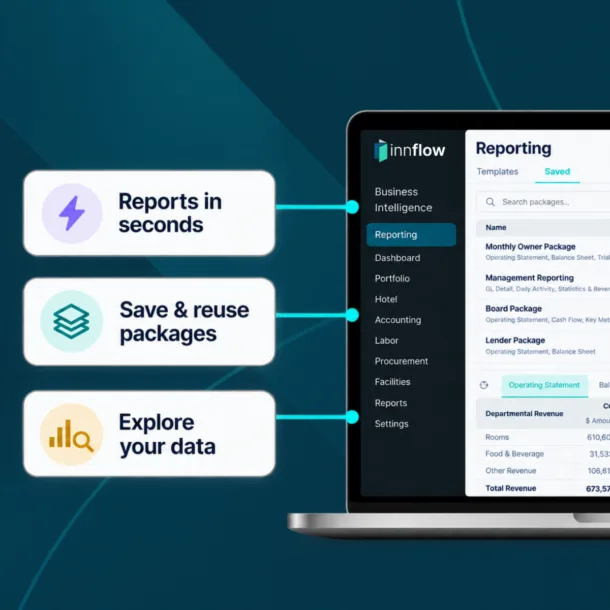
A report is most useful when your team can quickly get to the numbers it needs, compare related information, and return to the same view later. That’s the idea behind Essential BI, Inn-Flow’s new reporting experience.
Essential BI lets users bring multiple reports into a single workspace. In the webinar, Daryl stacked a general ledger and check register together, then applied property and date settings across both reports. Users can also filter, sort, and adjust individual reports, save their preferred views, and export or schedule reports configured for the task at hand.
For a finance team reviewing several properties, those shared settings can remove repetitive steps. Instead of setting the same date range and property selection each time they open another report, they can move through a group of reports with that context already in place.
Essential BI has begun rolling out with an initial set of reports. Inn-Flow plans to add more reports and expand the experience beyond Accounting over time.
Invoice Entry With Less Manual Work and Clear Review
Entering an invoice involves more than copying over a total. Teams need to identify the vendor, capture line items, apply the right chart of accounts, allocate taxes and fees, and check the result before approval.
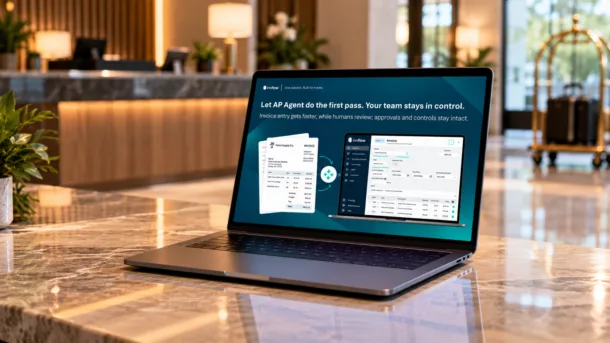
Inn-Flow’s AP Agent is designed to handle much of that first pass. When invoices arrive through the AP inbox, the agent can identify and separate multiple invoices in an attachment, extract their details, select a vendor, and suggest coding based on previous invoices for that vendor and hotel. It also prepares tax and fee allocations according to the team’s settings.
The outcome is a populated draft for a person to review. Fields that need closer attention are highlighted, and the invoice is not automatically sent for approval. Existing approval rules and workflows remain in place.
That distinction matters: the AP Agent can reduce the time spent entering and coding invoices while leaving the accuracy check and approval decision with the team.
At this time, the AP Agent is in beta, with general availability targeted for November.
A Faster Way to Receive and Check Inventory
Receiving an order can involve comparing the purchase order with the invoice, spotting price or quantity differences, and updating stock in the correct location. Each step takes time when teams have to do the comparison and entry manually.
In the Inventory preview, Omar showed how Inn-Flow brings the order and invoice together for review. The system highlights discrepancies, such as a price that differs from the original order, so a team member can decide whether to accept the item or flag the issue. Once receiving is completed, the accepted items update stock in the selected storage location.
The aim is to focus the team’s attention on differences that need a decision, instead of making them re-enter information the system already has.
Counting Stock by Voice
Inventory counts are another task that can become slow at scale. Staff move through storage locations, find each product in a list, and enter quantities one by one.
The webinar previewed a different approach: voice-enabled counting. As a team member says a product name and quantity, the system matches what they said to an inventory item and updates the count. They can keep moving through the storage location without searching for every product on screen.
Looking Ahead
These updates address different jobs, but they share a practical goal: reduce the steps between having information and using it. Essential BI makes reports easier to organize and revisit. The AP Agent prepares invoices for human review. Inventory automation helps teams identify receiving discrepancies and complete counts with less manual entry.
Inn-Flow will continue expanding Essential BI and share a preview of what’s being built for Inventory. Together, these developments point toward more connected hotel workflows across reporting, accounting, procurement, and stock management.
See the Full Webinar
Want to see the walkthroughs and Q&A?
Watch the full What’s New and What’s Next at Inn-Flow webinar →
Or request a demo to explore how Inn-Flow can support your team.